Provide documents to linked software

Provide documents to linked software

It is possible to control the entry of documents into theLinked Software. If a document does not appear to enter the software package, it can be indicated that it can be re-downloaded. When the document asDoubleIf marked, it first serves asOriginalto be marked by using the optionMark as original.
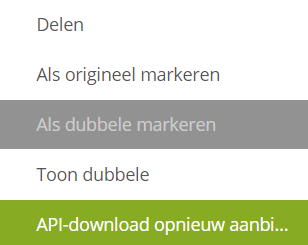
This can be both forSales as purchasing invoices. In the Inbox IN, or via the Purchase Invoices app, by clicking on the three dots behind document, the purchase invoice can be offered again as a download to the linked software. The same method applies to the Inbox OFF, or via the Sales Invoices app, so you can use a sales invoiceOffer as download.


    • Related Articles

    • Sharing of documents

      Documents can be shared with users, companies or groups with whom a relationship exists within the eConnect platform. There is a relationship if users are members of the same account or if a relationship has been created through the Partner feature. ...
    • Set retention policy documents

      There is anRetention policyin eConnect for deleting documents. The standard within eConnect is: Conversion tasks: 4 months Concept declarations: 2 years Incoming and sent invoices: 7 years Concept invoices: 2 years Incoming and sent invoices: 7 years ...
    • Current status

      If an update occurs, more information can be found on the Release note page. If this is not the case, we would like to hear from the Support question There are currently no outages. History 31-12-2025 08:00 - 02-01-2026 9:30 Booking documents to ...
    • Release Notes Platform

      Update 25.12.0 We would like to inform you that a platform update was deployed on Saturday, January 10th, 2026, at 2:30 AM CET. This update included a planned downtime of 2 hours. What’s New? Improved Look and Feel: In the previous release, we ...
    • Create connection keys in eConnect

      Are you intermediary/accountant? Follow the steps for connecting through a Request for authorisation. Note, connecting to eConnect is about port 443. However, it must be open on the server on which the software is installed/hosted in order to ...